Part of the free Module 5: Excel Formulas and Functions · Function 62 of 105 · Full Excel course
The Excel NETWORKDAYS function returns the number of working days between two dates, counting both dates when they fall on weekdays, excluding Saturdays and Sundays and optionally a list of holidays. It is the standard function for project durations, SLA measurement, leave calculations and any count that must ignore weekends.
Syntax
=NETWORKDAYS(start_date, end_date, [holidays])Arguments
| Argument | Required / Optional | Meaning |
|---|---|---|
| start_date | Required | The first date of the period, as a real date (cell, DATE or TODAY), not as ambiguous text. |
| end_date | Required | The last date of the period. If it is earlier than start_date, the result is negative. |
| holidays | Optional | A range or array of dates to exclude, such as public holidays. Holidays that fall on weekends are not double-counted. |
How NETWORKDAYS works
NETWORKDAYS counts every Monday to Friday from start_date to end_date inclusive, then subtracts any holiday dates that fall within the period on a weekday. =NETWORKDAYS("2026-09-01","2026-09-30") returns 22. If the start and end are the same weekday date, the result is 1; if that day is a Saturday, the result is 0. Time portions are ignored. Text that is not a valid date returns #VALUE!.
Step-by-step example
The screenshot shows NETWORKDAYS counting working days between pairs of dates, with a holiday list supplied as the third argument.
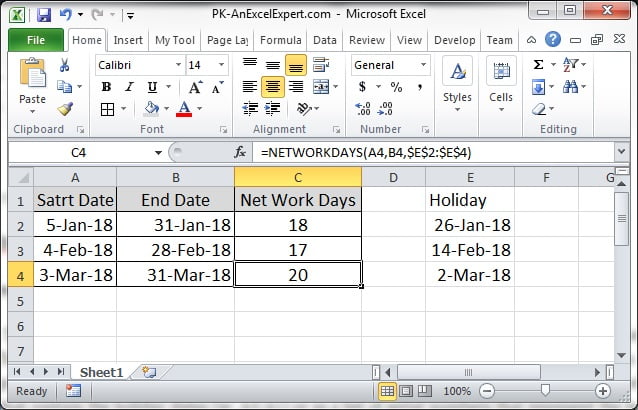
- Enter project start dates in column A and end dates in column B. List public holidays in E2:E12.
- In C2 enter
=NETWORKDAYS(A2,B2). For 1 to 30 September 2026 the result is 22 working days. - In D2 enter
=NETWORKDAYS(A2,B2,$E$2:$E$12). The holiday range is locked with dollar signs so it stays fixed when the formula is copied. - Fill both formulas down. Column D is lower than column C wherever a holiday falls inside the period on a weekday.
Practical use cases
1. Working days remaining this month
=NETWORKDAYS(TODAY(),EOMONTH(TODAY(),0),Holidays)2. Working days in any month
=NETWORKDAYS(EOMONTH(A2,-1)+1,EOMONTH(A2,0),Holidays)3. SLA: business days to resolve a ticket
=NETWORKDAYS(Opened,Closed,Holidays)-1Subtracting 1 excludes the opening day, so a ticket opened and closed on the same day counts as 0 days.
4. Annual leave days requested
=NETWORKDAYS(LeaveStart,LeaveEnd,Holidays)5. Working days elapsed as a percentage of a project
=NETWORKDAYS(Start,MIN(TODAY(),End))/NETWORKDAYS(Start,End)Common mistakes and tips
- Off-by-one expectations: NETWORKDAYS is inclusive. Monday to Friday of the same week returns 5, not 4.
- Relative holiday range: copying the formula shifts the holiday reference unless you use absolute references or a named range.
- Holidays stored as text: text dates in the holiday list are ignored silently. Make sure they are real dates.
- Different weekends: NETWORKDAYS always treats Saturday and Sunday as non-working. For Friday-Saturday or Sunday-only weekends use NETWORKDAYS.INTL.
- Negative results: the end date is before the start date. Wrap in ABS or swap the arguments.
NETWORKDAYS compared with NETWORKDAYS.INTL, WORKDAY and DAYS
NETWORKDAYS.INTL does the same job but adds a weekend argument, so it handles Middle Eastern Friday-Saturday weekends, six-day working weeks and any custom pattern through a seven-character string such as “0000011”. WORKDAY answers the reverse question: given a start date and a number of working days, what is the end date; it is the function for calculating deadlines and delivery dates. DAYS and plain subtraction count calendar days including weekends, which is appropriate for interest, ages and elapsed time but not for effort or SLAs. If your organisation has one fixed holiday calendar, store it on a separate sheet as a named range called Holidays so every NETWORKDAYS and WORKDAY formula can reference it consistently.
Related functions
- NETWORKDAYS.INTL: working days with a custom weekend pattern.
- WORKDAY: the date a given number of working days from a start date.
- DAYS: calendar days between two dates.
- EOMONTH: month boundaries for working-day counts.
- See all lessons in the Excel Formulas course.
Frequently asked questions
Does NETWORKDAYS include the start and end dates?
Yes. Both dates are counted when they fall on a weekday. Subtract 1 if you need the number of working days after the start date.
How do I exclude holidays with NETWORKDAYS?
List the holiday dates in a range and pass it as the third argument, for example =NETWORKDAYS(A2,B2,$E$2:$E$12). Use absolute references or a named range.
Can NETWORKDAYS use a weekend other than Saturday and Sunday?
No. NETWORKDAYS always excludes Saturday and Sunday. Use NETWORKDAYS.INTL and its weekend argument for other patterns.
Need a ready-made template? Browse 7,000+ Excel, Power BI and Google Sheets templates at NextGenTemplates.com.